







Transform How Your Team Works
Build a secure, flexible SharePoint environment tailored to your team’s workflow and business goals. Talk to a SharePoint expert.
Build a Secure, Central Hub for Collaboration with SharePoint
Imagine a central, secure hub where your team can effortlessly collaborate, manage content and access critical information. That’s the power of SharePoint, a cornerstone of modern work. This platform enables efficient and secure sharing of documents and data across your organization. By partnering with Convergence Networks for tailored SharePoint solutions, you can move beyond standard features to create an environment perfectly aligned with your unique operational needs, driving productivity and strengthening security.
How does this help you move faster and safer? We focus on building secure and efficient SharePoint environments that empower your team while safeguarding your valuable data.
SharePoint Solutions That Fit Your Workflow and Keep Your Data Safe
Your team might already be using SharePoint, but if it feels clunky or limited, it’s probably not set up with your workflows in mind. We fix that.
At Convergence Networks, we build secure, customized SharePoint environments that streamline how your team works and keep your data protected.
With our help, you can:
- Tailor SharePoint to fit your day-to-day
- Automate tasks to save time
- Collaborate securely, inside and outside your organization
- Keep sensitive information organized and controlled
Ready to get more out of SharePoint?
Maximize Your Microsoft 365 Investment: Unleash the Full Power of SharePoint
Unlock the full potential of your business and your Microsoft 365 investment with Convergence Networks’ expert SharePoint services. We focus on maximizing secure collaboration, boosting productivity and driving efficiency. Contact us today for a consultation on how we can tailor SharePoint to your unique needs.
Intranet Development
Boost productivity with an intranet designed for quick, secure access to essential information.
Custom SharePoint Solutions
We design, develop and implement secure solutions tailored to your needs and compliance requirements.
Workflow Automation
Automate routine tasks securely and free your employees for higher-value activities.
Add-Ins and Apps
Extend your platform’s capabilities with secure add-ins and apps that integrate seamlessly.
Migration Services
Count on a smooth and secure transition when we migrate your existing data and content to SharePoint.
SharePoint Training
Our specialists provide training that empowers users while emphasizing secure practices.
How will this make your team’s life easier or better? A well-designed and secure SharePoint environment simplifies collaboration and information access, reducing frustration and improving focus.
Introducing the Intelligent and Secure Intranet within Microsoft 365
Bring your organization together with a dynamic, branded SharePoint intranet, built with security at its core.
- Company-Wide News Sharing
- Team-Specific Collaboration
- Secure External Collaboration and Sharing
- Easy Access From Anywhere, Any Device
- Robust Permissions Management
Company-Wide News Sharing
Keep everyone informed through secure and controlled communication channels.
Team-Specific Collaboration
Foster teamwork with secure and dedicated collaboration spaces. opportunities for credential-based attacks.
Secure External Collaboration and Sharing
Extend collaboration with partners and clients while maintaining control.
Easy Access From Anywhere, Any Device
Enable flexible work while maintaining robust security protocols.
Robust Permissions Management
Ensure data security and compliance with granular access controls.
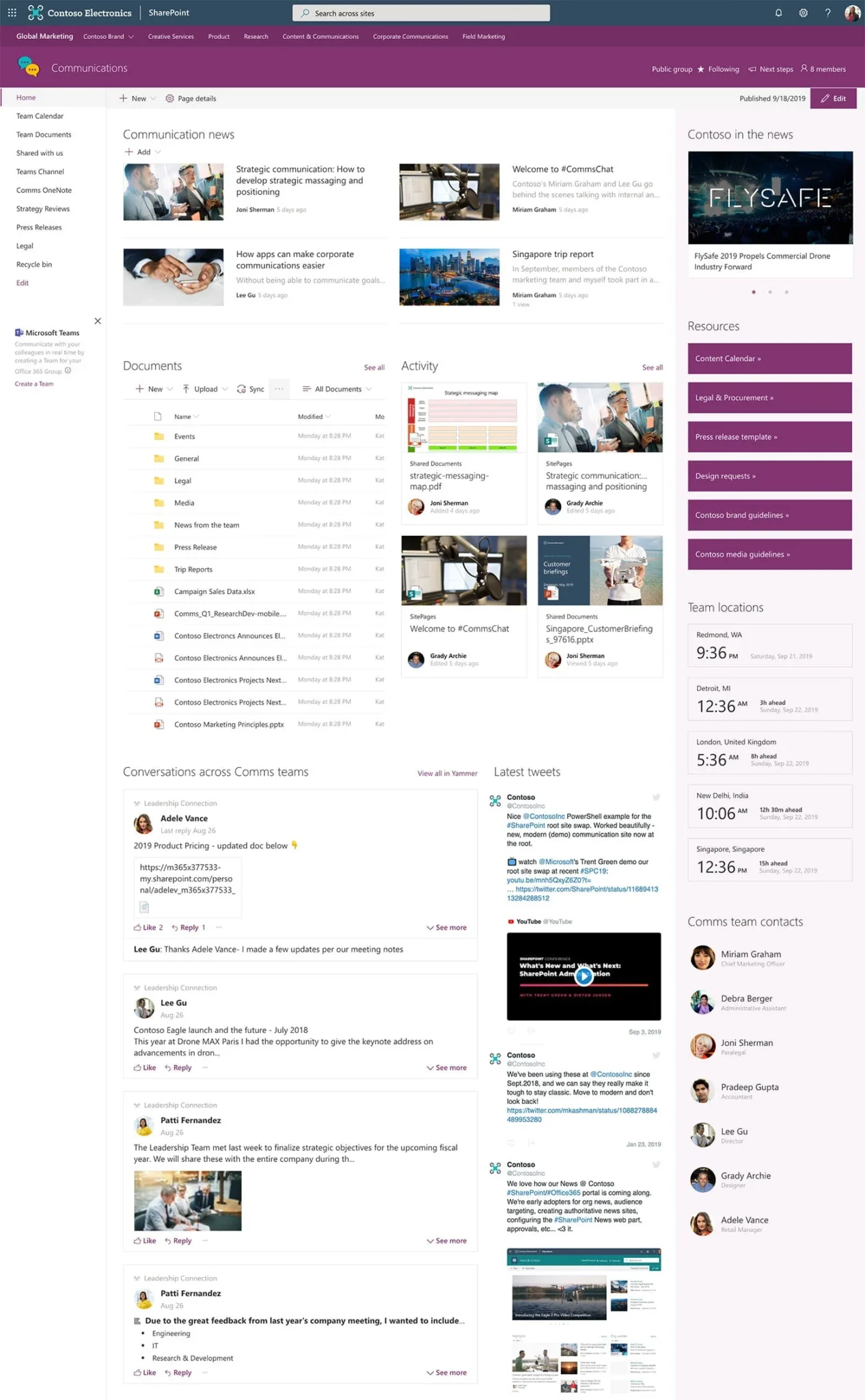
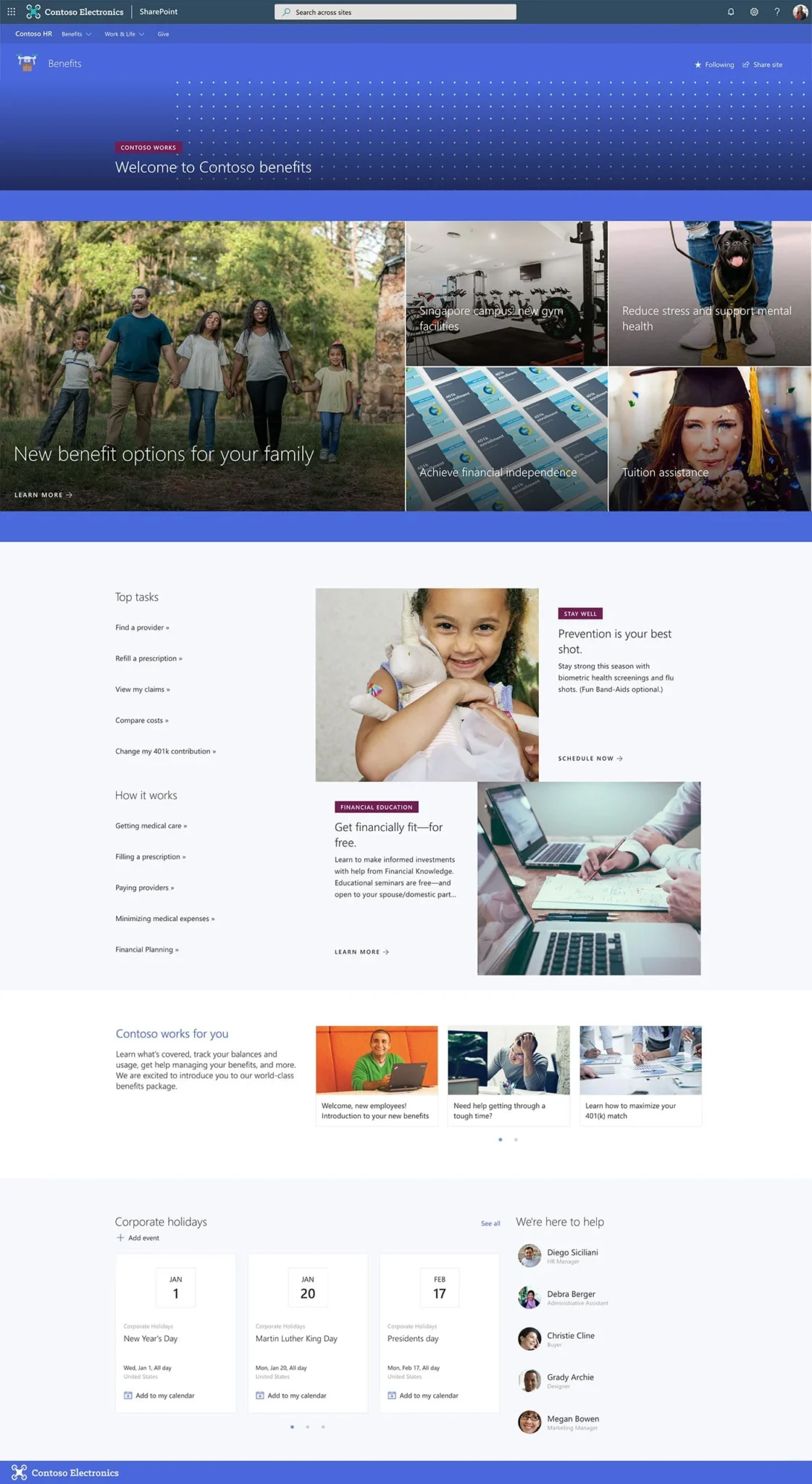
SharePoint Design Lookbook
Here are example SharePoint designs from Microsoft.
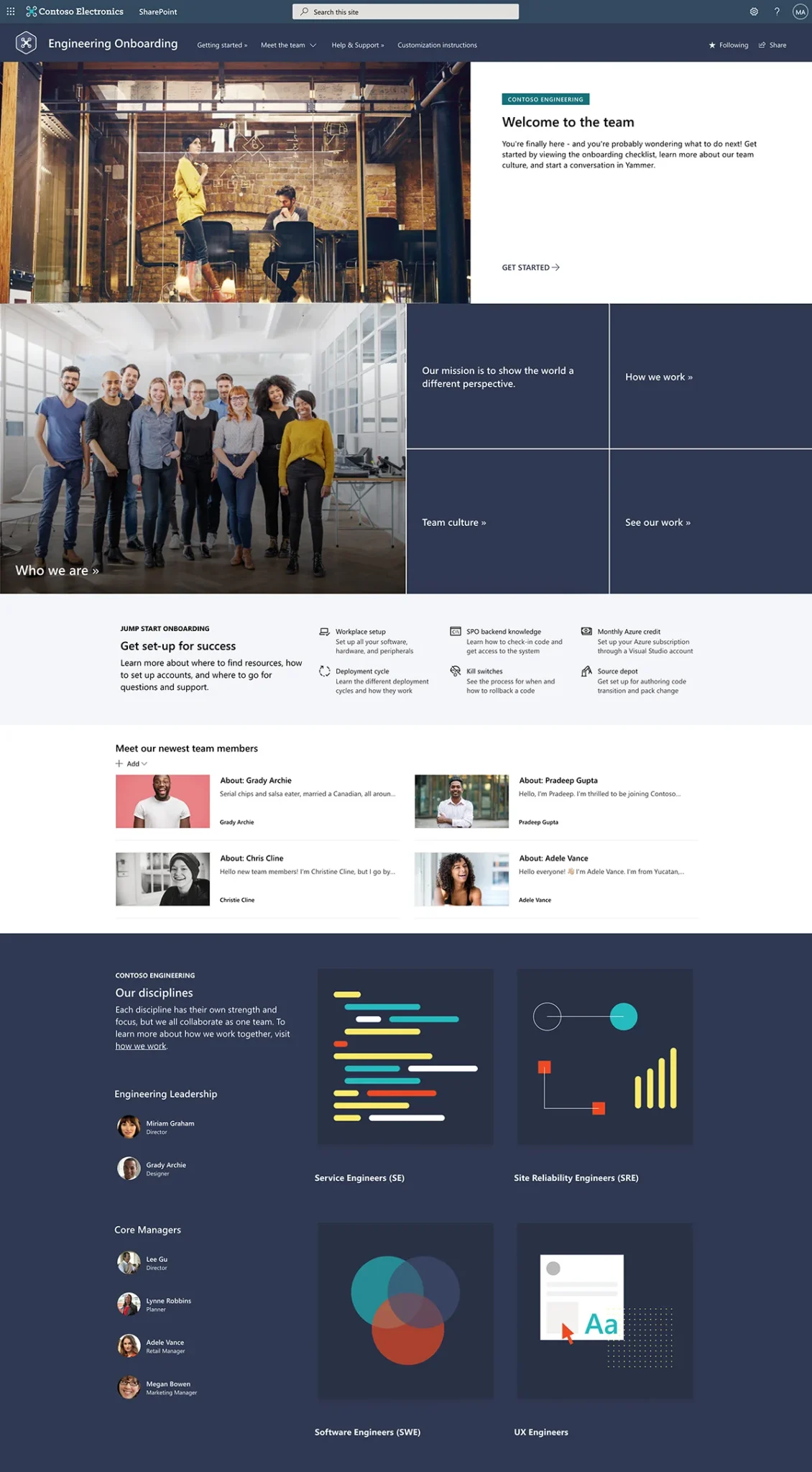
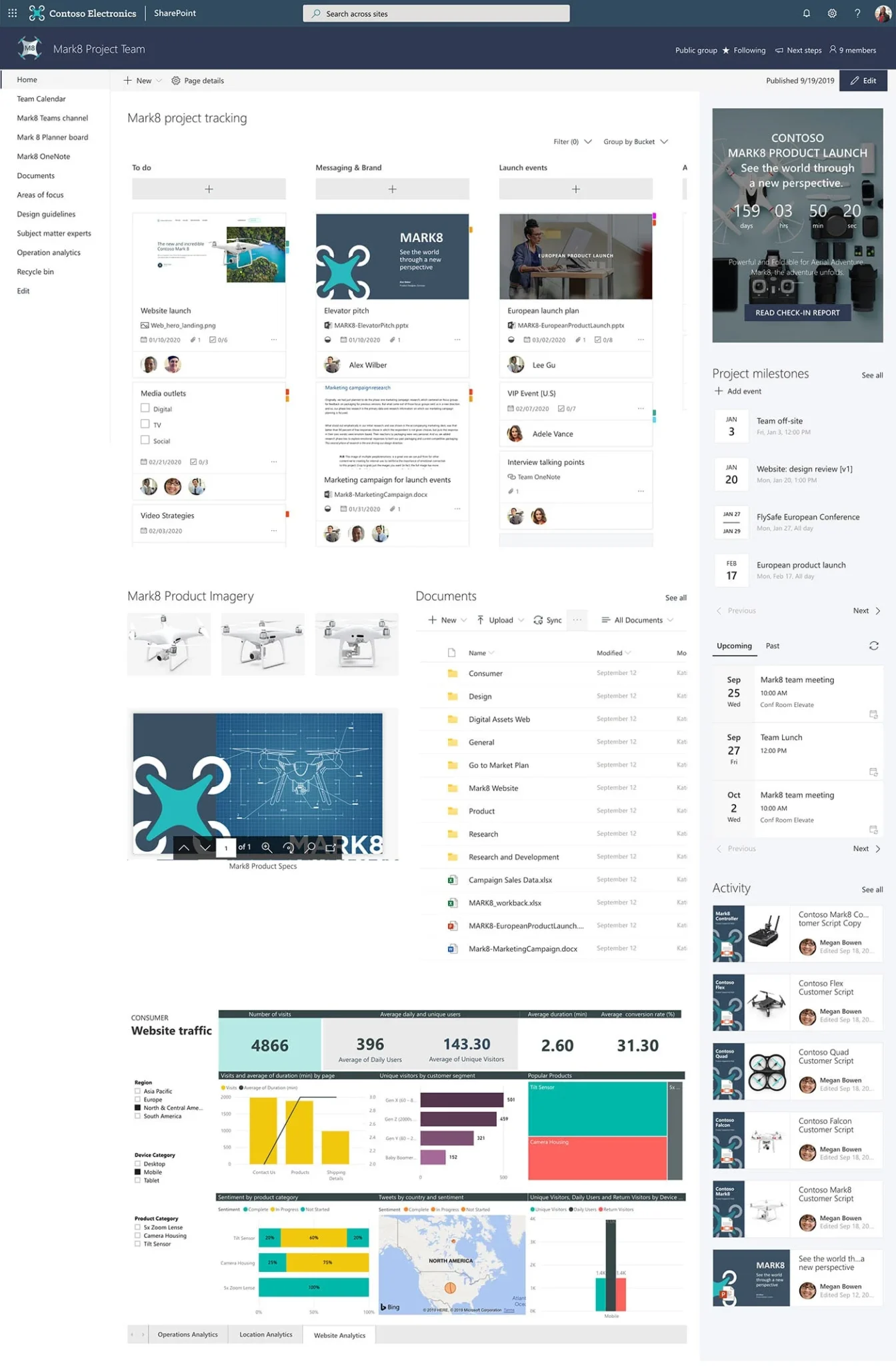
Secure "Intranet-in-a-Box": Your Fast Track to a Connected and Protected Workplace
A well-structured intranet is crucial for strong employee engagement and timely access to essential information. Our secure “intranet in a box” packages offer a quick, efficient and budget-friendly way for organizations to launch a minimal, turn-key SharePoint intranet, built with foundational security measures.
Move faster and safer: Get a secure and functional intranet up and running quickly, providing immediate benefits for collaboration and communication.
Frequently Asked Questions About Our SharePoint Development Services
An intranet is a private, internal network used by an organization’s employees for communication, collaboration, sharing information and accessing resources. It’s essentially a website accessible only to people within the company.
- Improved communication: Facilitates internal news sharing, announcements and discussions.
- Enhanced collaboration: Provides platforms for teamwork, project management and document sharing.
- Centralized information access: Offers a single point of access for important documents, policies, procedures and resources.
- Increased employee engagement: Fosters a sense of community, shares company culture and provides a platform for feedback.
- Streamlined processes: Automates workflows, simplifies forms and improves efficiency.
- Knowledge sharing: Captures and disseminates organizational knowledge and best practices.
On an intranet, you can typically find company news and announcements, an employee directory, document libraries and management, policy and procedure repositories, forms and workflows, project collaboration spaces, calendars and events, employee profiles, and internal communication tools (e.g., blogs, forums).
- Organizational goals and needs: What problems are you trying to solve?
- Target audience: Who will be using the intranet and what are their needs?
- Content strategy: What information needs to be included and how will it be managed?
- User experience (UX) and design: How can you make the intranet intuitive and easy to use?
- Technical infrastructure: What platform will you use and how will it be maintained?
- Governance and ownership: Who will be responsible for the intranet’s content and upkeep?
- Security and access control: How will you ensure only authorized employees can access the intranet?
- Change management and training: How will you introduce the intranet to employees and ensure adoption?
A SharePoint intranet is an intranet built using Microsoft SharePoint. It leverages SharePoint’s features and functionalities for content management, collaboration, workflow automation and more to create an internal communication and collaboration hub.
Companies choose SharePoint for its integrated platform that seamlessly integrates with other Microsoft 365 services like Teams, OneDrive and Outlook. SharePoint also offers content management that allows for organizing, storing and managing documents and information. Collaboration features, such as team sites, document sharing, co-authoring, and task management, are beneficial, as is SharePoint’s ability to be customized through configuration and development to meet specific needs. The platform enables the creation of automated business processes with workflow automation. Finally, SharePoint is scalable and also benefits from Microsoft’s robust security and compliance features.
- Homepage: Provides an overview of important news, links and resources.
- Departmental or team sites: Dedicated spaces for specific teams or departments to collaborate and share information.
- Document libraries: Centralized storage for files and documents with version control and permissions.
- News and announcements: Platform for sharing company-wide updates and information.
- Employee directory: A searchable database of employee contact information.
- Policy and Procedure Pages: Easily accessible repository for important company guidelines.
- Search Functionality: Powerful search capabilities to quickly find information across the intranet.
- Navigation: Clear and intuitive navigation to help users find what they need.
Yes, SharePoint is highly customizable. Organizations can tailor the look and feel, navigation, features and functionalities to align with their branding and specific requirements through configuration and custom development.
SharePoint development involves creating custom solutions, applications and functionalities on the Microsoft SharePoint platform to extend its out-of-the-box capabilities and meet specific business needs.
- Custom web parts and components
- Custom applications and tools
- Automated workflows
- Custom branding and user interfaces
- Integrations with other systems
- Document management solutions
- Collaboration tools
- Business intelligence dashboards