





You might already follow the basics like using strong passwords, enabling multi-factor authentication (MFA), and keeping your software updated. These steps are important, but mistakes can still happen during routine work. A single click, an unexpected attachment, or a rushed response can expose sensitive information and put your organization at risk.
Most incidents occur not because of advanced hacking but because of human behavior. Social engineering exploits this by using trust, urgency, and familiarity to persuade people to click, share, or approve something that appears legitimate.
This blog looks at real-life situations you might face at work and explains how to handle them effectively. These simple moments, when managed correctly, can make a big difference in keeping your organization secure.
You clicked a suspicious link, but nothing happened
If you clicked a link that seemed trustworthy but nothing happened, that can actually be a sign that something is wrong. Do not ignore it. Disconnect from Wi-Fi, run a security scan, and report the incident to your IT team immediately.
Even if you do not notice anything unusual, the link might have installed hidden software or sent data without your knowledge. Reporting it helps your IT team contain the risk before it spreads and allows them to warn others who might have received the same message.
You downloaded an attachment you were not sure about
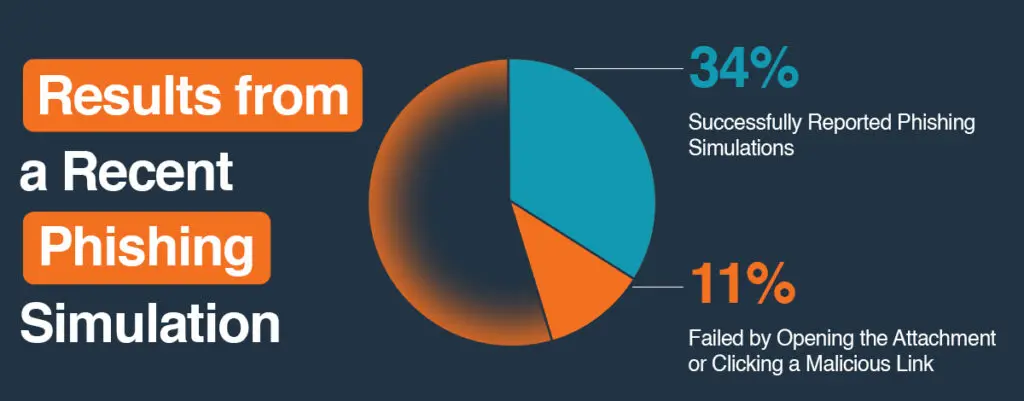
If you downloaded an unexpected attachment, do not open it. Leave the file as it is and contact your IT team right away so they can review it safely and determine if it poses a risk.
Before opening any attachment, take a moment to review it. Look closely at the sender’s email address, confirm whether you were expecting the file, and check that the file type makes sense. Social engineering messages often seem routine but include small signs of danger, such as unusual urgency or slightly incorrect details. If anything feels suspicious, reach out to the sender through another trusted method to confirm before opening.
If you have already downloaded the file, report it immediately. Acting quickly helps IT contain any potential risk and prevent further impact.
You see a new login notification from a location you do not recognize
Treat this as a warning if you see a new login notification or receive an unexpected MFA prompt that does not match your activity; act immediately. Change your password, sign out of all active sessions, and alert IT with the details. If you have reused that password anywhere else, change it there as well.
Using a password manager helps create strong, unique passwords and prevents reuse that could expose multiple accounts at once.
You are about to plug in a USB from outside the office
Do not plug in external USB drives without having IT check them first. Unknown drives can contain harmful software that activates as soon as it connects to your device. Some malware can even disrupt control systems.
Always verify with IT before using any removable media from outside the organization. Secure file transfer platforms or approved cloud storage are much safer options.
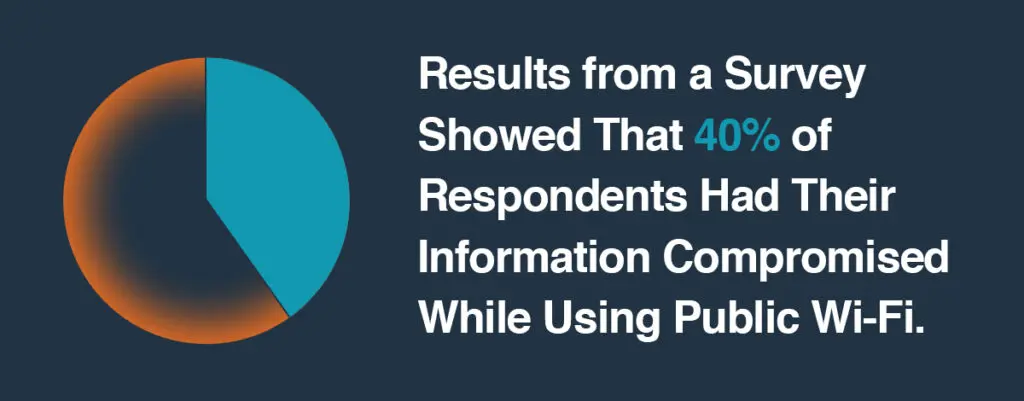
You need to use your work device on public Wi-Fi
When using public Wi-Fi, always turn on your company VPN before connecting. Avoid logging into systems that handle confidential or financial information. Public Wi-Fi can allow attackers to intercept unprotected data.
If you can, use your phone’s hotspot instead. It provides a more secure and private connection when you are working remotely.
A colleague asks for sensitive data, but something feels off
Phishing messages are not always external. Attackers often imitate internal contacts to gain trust.
If you receive a message asking for sensitive information through email, Teams, Slack, or even by text, and it feels out of character, pause before responding. It is possible to spoof phone numbers and make messages look legitimate. Call or message the person directly on another platform to confirm. A quick check can prevent major data exposure.
Your browser suddenly has a new extension or pop-up
If your browser has a new extension or unexpected pop-ups, contact your IT team right away. They can help determine whether it is safe and guide you through the next steps. While you are reaching out, close your browser and, if possible, run a full device scan.
Malicious extensions can track activity, capture keystrokes, or redirect traffic without your knowledge. Acting quickly helps stop further data loss.
An application asks for permissions it should not need
If an app asks for permissions that do not match its purpose, deny access until IT can confirm it is safe. A calculator or note app should not need access to your contacts, location, or camera.
Granting unnecessary permissions can expose sensitive information and increase security risks.
Old accounts you no longer use still have access
Inactive accounts are often forgotten, but they remain potential entry points for attackers. Review your access regularly and remove any unused accounts or shared permissions.
This includes cloud platforms, software tools, and vendor logins. Keeping access lists up to date strengthens your organization’s overall security posture.
You share files on cloud storage
Before sharing a file, always double-check who has access. Confirm whether recipients should have view-only or editing rights, and whether sharing should be internal or external.
Simple habits like checking permissions before sending links help prevent accidental data exposure and maintain control over sensitive information.
Small actions that make a big difference
Cybersecurity is built on daily habits, not just tools. Every small decision adds up. When you stop to double-check an email, verify a request, or report a concern, you are strengthening your organization’s defences.
Mistakes happen to everyone, but responding quickly and communicating with IT makes all the difference. Awareness is not about fear; it is about confidence. Knowing what to do in the moment helps protect both you and your team.
At Convergence Networks, we focus on helping people make confident, informed decisions that keep their technology and data secure. When people are empowered to act safely, organizations become more resilient and better protected.