





Every October, Cybersecurity Awareness Month gives business leaders a reason to stop and ask a simple question: if an attacker targeted us tomorrow, would we be ready? In 2026, that question carries more weight than ever. Attacks are faster, more convincing and increasingly powered by AI, and the cost of a single breach has hit record highs in both Canada and the United States.
Most successful attacks still rely on a handful of predictable weaknesses, and nearly every one of them can be closed. Below, we break down the threats doing the most damage in 2026, and the steps every business should take right now.
A Data Breach Now Costs More Than Ever
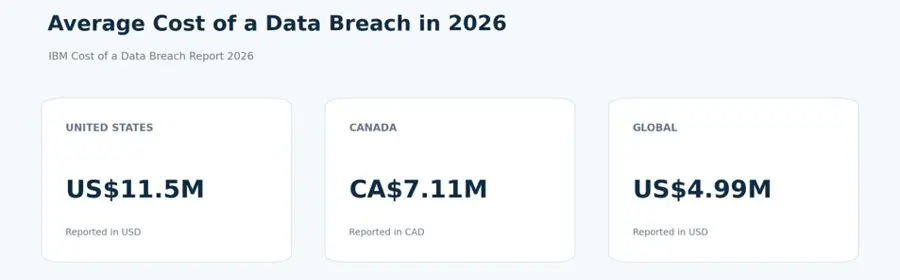
A single breach can undo years of growth, and the cost of a data breach has grown significantly. However, this cost is not just for restoring files but covering investigations, downtime, legal obligations and lost customer trust:
Moreover, these incidents don’t get solved within a day or week but can take months. Organizations worldwide took an average of 247 days to identify and contain a breach. The longer an attacker goes unnoticed, the more the damage grows, which is why stopping an attack early matters far more than cleaning up after one.
Phishing Remains the Front Door for Attackers
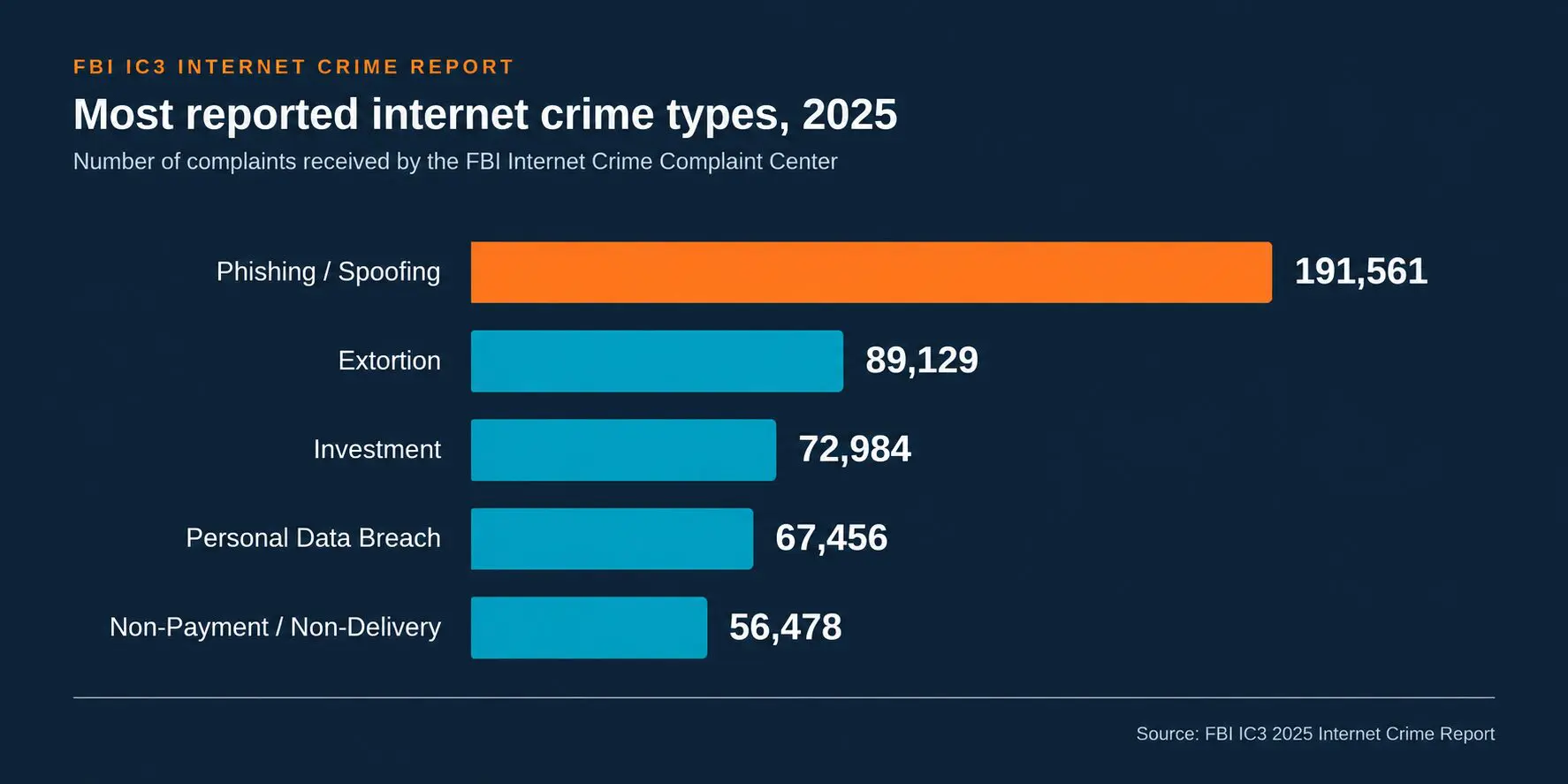
Phishing is still the most common way attackers get in. The FBI Internet Crime Complaint Center (IC3) received 191,561 phishing and spoofing complaints in its most recent annual report, making it the #1 reported internet crime type by a wide margin. That works out to 18.99% of every complaint filed, more than extortion and investment fraud combined.
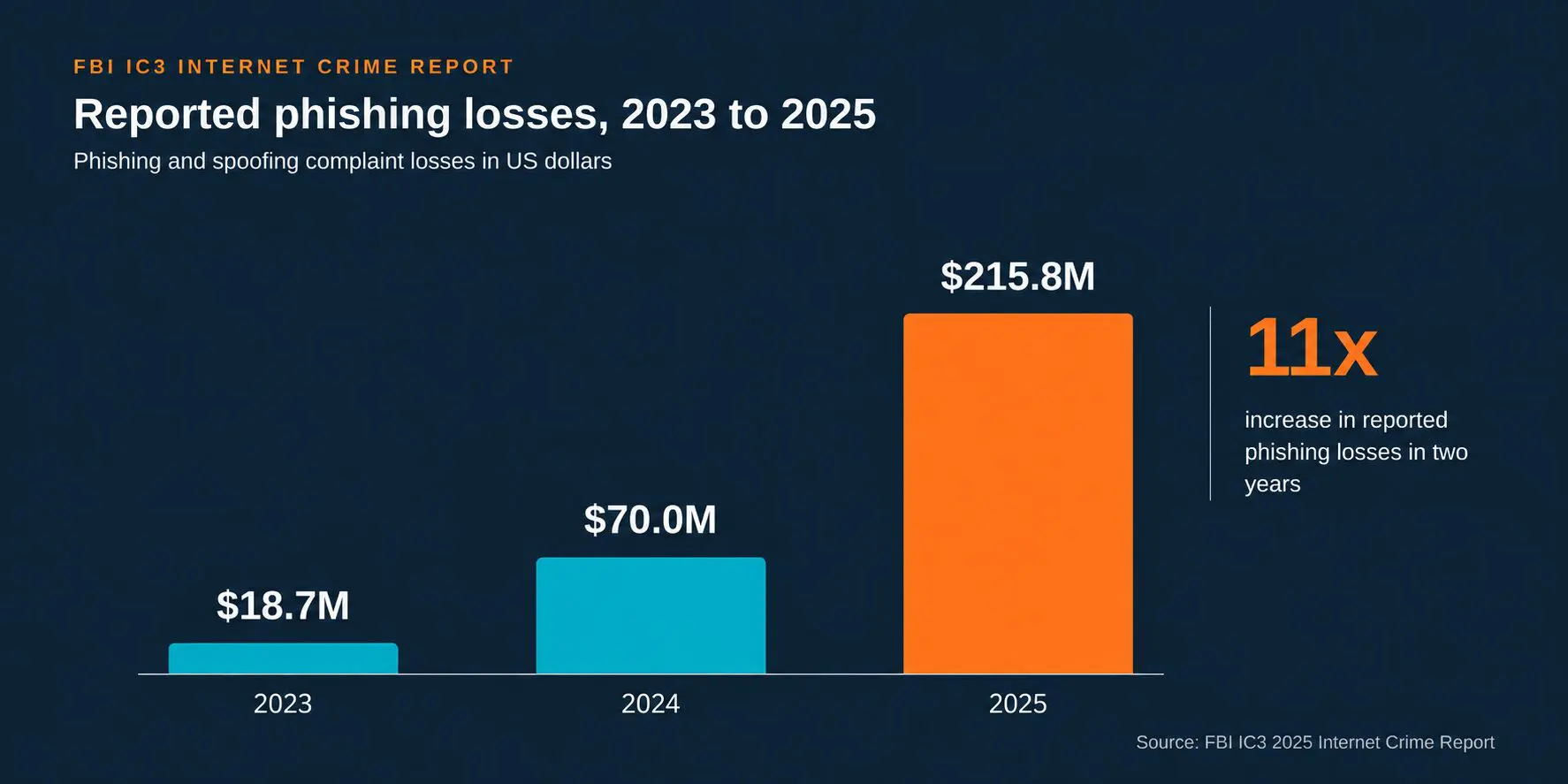
Furthermore, phishing is getting easier to launch and far more expensive to fall for. Generative AI and Phishing-as-a-Service (PhaaS) kits let even inexperienced criminals send polished lures at massive scale, with roughly 7.6 billion phishing threats detected in a single three-month period this year, and reported phishing losses jumped from US$18.7 million in 2023 to US$215.8 million in 2025. At Convergence Networks, we help clients reduce these risks through cybersecurity awareness training that teaches employees to recognize phishing attempts before they click. DNS filtering provides another important layer of protection, helping block connections to known malicious and phishing domains before users reach them.
What Your Business Should Do
DNS protection can significantly reduce the risk associated with a malicious click by blocking access to known harmful domains, but it is only one layer of defense; your employees remain your first line of defense. Build safe habits through regular cybersecurity training and create a culture where anyone who spots a phishing attempt reports it to IT immediately, without fear of blame. The faster a suspicious message is reported, the faster your IT team can contain it before it spreads.
Stolen Credentials Can Lead to Account Takeover
The human element remains the biggest reason data breaches happen, driven mainly by compromised or stolen credentials, such as weak or reused passwords, and social engineering like phishing. Credential phishing accounted for 94% to 96% of all malicious payload attacks each month during the second quarter of 2026, because a valid username and password lets an attacker walk straight through the front door.
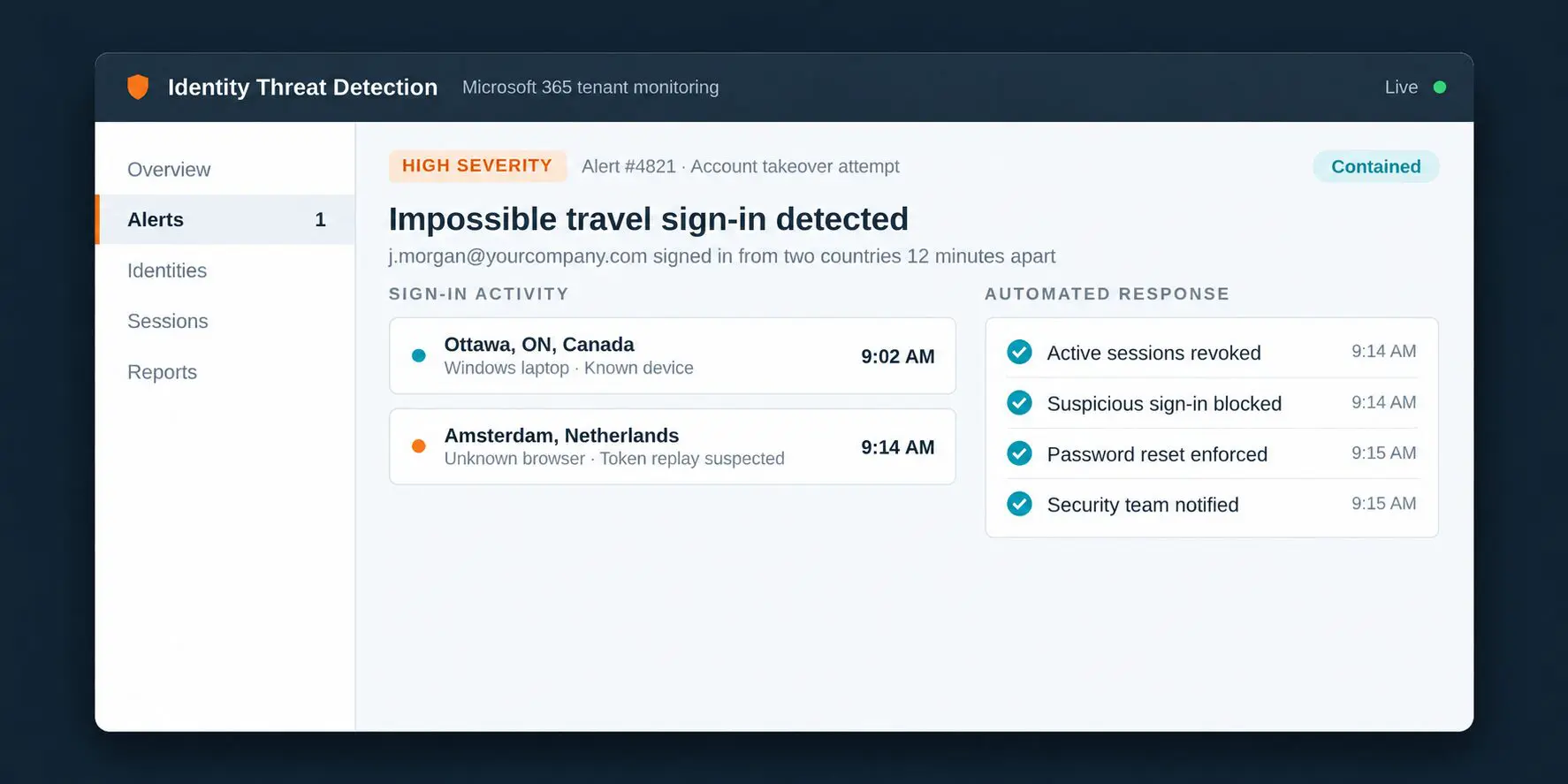
Once inside a legitimate Microsoft 365 account, an attacker can read email, impersonate employees, approve payments and move deeper into the network, often without setting off a single alert. Moreover, session hijacking lets attackers reuse a signed-in session and sidestep some forms of MFA entirely. At Convergence Networks, our Identity Threat Detection and Response (ITDR) solution helps protect Microsoft 365 accounts by identifying suspicious sign ins, account takeover attempts, and session hijacking. It provides greater visibility into identity threats, allowing our team to investigate and respond before an incident escalates. Wishing to learn more about ITDR? Read more HERE
What Your Business Should Do
Identity has become a primary attack surface, and by 2028, 70% of CISOs will rely on identity visibility and intelligence to reduce the risk of credential compromise. Alongside that monitoring, every organization should make credentials much harder to steal and reuse:
- Multi-Factor Authentication (MFA): Add an extra verification step beyond just a password, so a stolen password alone is not enough to access an account.
- Password Managers: Use strong, unique passwords for every account without writing them down.
- Active Monitoring: Use an active monitoring solution that watches sign-in activity around the clock and flags unusual behavior as soon as it happens.
Social Engineering Targets Your People Directly
Not every attack relies on a malicious link. Between 87% and 92% of initial business email compromise (BEC) messages in Q2 2026 opened with a harmless question, such as asking whether someone was available, to build trust before making a request. BEC went on to generate more than US$3 billion in reported losses in 2025, and attackers are increasingly reaching employees through Microsoft Teams messages and voice calls while posing as IT support.
Furthermore, AI is making these scams much harder to spot. One in four malicious breaches is now AI-enabled, and voice and SMS phishing carried the highest average breach cost of any attack vector at US$5.29 million. At Convergence Networks, we actively run phishing simulations and short monthly Security Awareness Training (SAT) for our clients: simulations test what employees know, while SAT builds on it.
What Your Business Should Do
Training works best when it is backed by clear policies that employees can follow under pressure. Build these expectations into everyday operations:
- Regular Security Training: Teach employees how to spot phishing lures and report suspicious activity.
- Verify Before Acting: Confirm any request involving payments, credentials or sensitive data through a second, trusted channel.
Other Good Cybersecurity Hygiene Practices
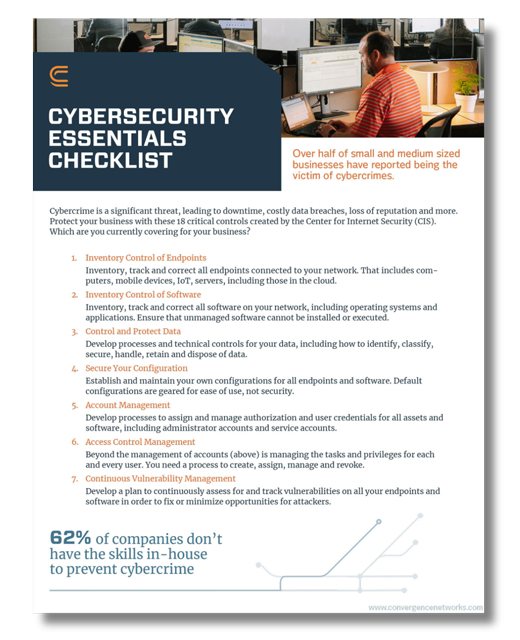
Beyond the threats above, a few quick checks can close gaps that often go unnoticed. Add these to your Cybersecurity Awareness Month checklist:
- Review Your AI Policies: Make sure your business has a clear AI usage policy. Work with your IT team or provider to understand what tools are available to identify unapproved AI applications and monitor their access to company systems and sensitive data.
- Check for Unapproved Browser Extensions: Audit employee browsers for extensions that have not been approved, since many request broad access to email, files and the websites people visit.
- Confirm Everyone Has MFA Enabled: Verify that every account, including executives, shared mailboxes and admin accounts, has MFA turned on.
Make This Cybersecurity Awareness Month Count
The threat landscape will keep shifting, but the pattern behind most breaches has stayed remarkably consistent: attackers go after people, the credentials they hold, and the systems left unpatched. With breach costs averaging US$11.5 million in the United States and CA$7.11 million in Canada, organizations cannot afford to wait until after a security incident to strengthen their defenses. Cybersecurity preparedness is a business necessity.