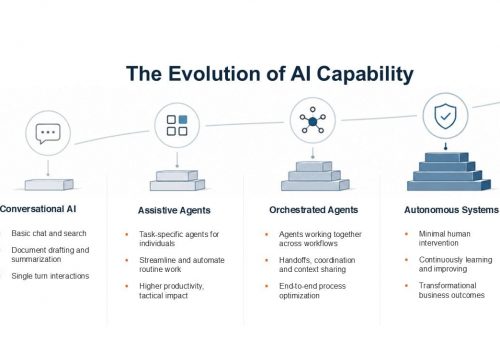








Your team probably already has AI built into the tools it uses every day, yet most businesses are using only a fraction of it. Meanwhile, the tools keep moving: in 2026, AI agents made the biggest leap. Instead of only answering questions, agents now complete tasks, connect workflows, and handle multi-step work. In fact, Microsoft’s 2026 Work Trend Index says active agents in the Microsoft 365 ecosystem grew 15x year over year (18x in large enterprises).
However, adopting AI isn’t simply about keeping up with technology. It’s about cutting repetitive work, reducing errors, and freeing employees for work that needs their expertise. You also don’t need a complex system to see results. Below are 15 AI use cases to help you think about where AI fits in your business and where it could make the biggest difference. Where it helps, we’ve noted the Microsoft tools you’d likely use to get started.
Everyday AI Use Cases That Businesses Can Start With
You don’t have to change how your business operates to benefit from AI. Many organizations already use Microsoft 365, Teams, and other applications with built-in AI features. The first step is to spot the repetitive tasks that eat up employee time.
1. Drafting RFP Responses Faster
RFP responses often pull from past proposals, service descriptions, pricing documents, and several internal teams. AI can search approved company content, draft first responses, and flag details that still need input. As a result, your sales team spends less time rewriting the same answers and more time on the customer’s requirements.
Tools to try: Copilot Cowork or the Researcher agent, drawing on approved proposals and service descriptions stored in SharePoint.
2. Simplifying Expense Reviews and Approvals
Expense reviews mean checking receipts, comparing claims against policy, and chasing missing information. AI-supported workflows extract receipt details, flag possible policy exceptions, and route each claim to the right approver. Finance teams can then focus on exceptions rather than every routine submission.
Tools to try: Power Automate with AI Builder receipt processing, or an approval agent built in Copilot Studio.
3. Reviewing Marketing Content for Brand Consistency
Keeping the message consistent gets harder when several people create web pages, emails, ads, and social posts. AI compares drafts against your brand guidelines, flags inconsistent terms and unsupported claims, and suggests fixes. Reviewers then spend less time on routine checks and more time on substance.
Tools to try: Copilot in Word and PowerPoint, using your brand kit or a review skill built from your brand guidelines.
4. Creating Customer Support Ticket Summaries
Support cases often span multiple emails, calls, troubleshooting steps, and updates. AI condenses this history into a short summary that shows the issue and what has already been tried. The next person on the case gets up to speed without reading the full thread.
Tools to try: Copilot in Dynamics 365 Customer Service or Microsoft’s Service Agent. If you use another help desk platform, check its built-in AI summary features.
AI Use Cases That Connect Multiple Workflows
Some of the most valuable AI opportunities cross departments. A process might start in HR, need a manager’s approval, and end with IT setting up system access. When each step is managed separately, details slip and employees spend time following up. Combined with workflow automation, AI links these steps into one coordinated process.
5. Coordinating Employee Onboarding
Onboarding involves HR, IT, the hiring manager, and often other departments. AI-supported workflows organize checklists, track progress, send reminders, and flag outstanding items. For example, a confirmed start date can trigger equipment requests, account setup approvals, and training assignments.
Tools to try: Copilot Studio or Power Automate, connected to your HR system and Microsoft Entra for account setup.
6. Managing Employee Training and Development
Tracking mandatory training, course assignments, and manager sign-offs creates a lot of admin work. AI helps HR teams spot incomplete requirements, organize learning records, and send reminders across existing systems. Managers receive a summary of outstanding items instead of checking individual records.
7. Managing Content Reviews and Approvals
Publishing content often requires input from marketing, sales, leadership, legal, or compliance. AI-supported workflows identify which approvals each piece needs, track progress, and notify reviewers when it’s their turn. This prevents missed approvals and keeps outdated messaging off your website.
8. Making Internal Knowledge Easier to Find
Employees lose time digging through documents, shared folders, and knowledge bases. An AI knowledge assistant lets them ask questions in plain language and get answers from approved company sources. A support representative can find a troubleshooting procedure in seconds, while HR quickly locates a policy.
Tools to try: Agent Builder in Copilot or Copilot Studio, grounded in your SharePoint sites so existing permissions are respected.
Advanced AI Use Cases and AI Agents for Business
Traditional AI assistants respond to one request at a time. AI agents go further: they complete a sequence of tasks, use connected tools, and take defined actions within set boundaries. These use cases offer the biggest gains, but they also depend most on the foundations covered in the next section.
9. Identifying Customers Who May Be at Risk of Leaving
Losing a customer hurts revenue, especially when the warning signs go unnoticed. AI analyzes service requests, feedback, and engagement trends to flag accounts that need attention. For example, repeated unresolved tickets could prompt an account manager to reach out before the relationship suffers.
10. Monitoring Supply Chain and Order Disruptions
Inventory, supplier, and order information often lives in separate systems. AI agents monitor order status, shipment updates, and supplier activity to flag unusual delays. Operations teams get an alert when something needs attention, rather than waiting for a customer complaint.
11. Finding Opportunities to Reduce Business Spending
Many organizations pay for software, services, and subscriptions that go underused. AI analyzes purchasing records, license usage, supplier contracts, and renewal dates to flag overlapping tools and unusual spending. Your business cuts waste without taking away the tools employees rely on.
12. Supporting Cash Flow Planning and Financial Forecasting
Cash flow planning brings together invoices, payment histories, and billing records. AI organizes this data, spots trends, and builds forecast scenarios, such as months when expenses may exceed incoming cash. Finance teams review the assumptions and use the insights to plan ahead.
Tools to try: Copilot in Excel or the Analyst agent.
What Businesses Should Consider Before Using AI
AI tools often touch customer records, confidential documents, and financial data. Without safeguards, they can expose information, produce inaccurate results, or act outside company policy. Before you connect AI to important workflows, review these seven areas:
- Data security and privacy: Know what information AI tools can access, where it’s processed, and how sensitive data stays protected.
- Employee permissions: Make sure AI respects existing access controls, so people and agents only reach what they’re authorized to.
- AI governance: Set policies for acceptable use, ownership, approvals, and how AI activity is monitored.
- Accuracy and reliability: Check AI output against trusted sources, especially for financial records and business decisions.
- System integration: Confirm that AI tools connect securely and reliably with the applications each workflow depends on.
- Human oversight: Decide which actions need employee approval and how to handle mistakes.
- Cost and licensing: Some AI tools are billed by usage on top of per-user licences. For example, starting December 1, 2026, usage-based billing (Copilot Credits) is turned on by default for new Microsoft 365 Copilot Business licences purchased through Microsoft partners. Set spending limits and alerts before rollout so costs stay predictable.
AI adoption also brings ongoing responsibilities, such as regular monitoring and, above all, employee training. Microsoft’s research found that organizational factors such as culture and manager support drive about twice as much of the reported AI impact as individual effort (67% vs. 32%), yet only 26% of AI users say their leadership is clearly aligned on AI. How well your people are prepared matters as much as the tools themselves. The NIST AI Risk Management Framework offers useful guidance for identifying and managing AI risks. A responsible approach lets you explore new capabilities while protecting your data and customer relationships.
How to Identify the Right AI Opportunities for Your Business
With so many options, where should your business begin? Start with tasks that happen often, take heavy manual effort, or cause delays between departments. Then use these five steps to move from idea to results:
- Assess your AI readiness. Review your technology, data quality, permissions, and security controls to confirm you can adopt AI securely.
- Identify repetitive processes. Ask each department which tasks take the most time or need constant follow-up.
- Prioritize by business value. Weigh each opportunity’s expected benefit against its cost, complexity, and security requirements.
- Start with one defined use case. Pick a manageable workflow, define success, and pilot it with a small group before expanding.
- Measure results and adjust. Track metrics such as processing time, error rates, and operating costs to confirm the solution delivers value.
Making AI Work for Your Business
AI made real progress in 2026, and businesses now have more ways to put it to work. The greatest value, though, comes from solving real business problems rather than adopting technology because it’s available. At Convergence Networks, we help businesses move from exploring AI to using it confidently and securely.
Our AI Readiness Assessments, AI Solutions, and AI Adoption Training services cover every stage. We assess your environment, identify high-value use cases, and put the right security and governance controls in place. Then we implement solutions and train your teams to use them with confidence.
Whether you’re just getting started or ready to connect complex workflows, we’ll help you find the right approach. Ready to see where AI could make a difference in your business? Contact Us